
Most business owners know they should post on Google Business Profile. Few actually do it consistently. Between managing staff, handling customers, and keeping operations running, creating Google posts regularly often falls to the bottom of the to-do list.
That’s where scheduling comes in. Google Business Profile now lets you create posts in advance and set them to go live automatically—meaning you can batch your content when you have time, rather than scrambling to post in the middle of a busy week.
This guide walks you through exactly how to schedule a post on Google Business Profile, why it matters for your local SEO, and the best practices that will help your posts actually drive results.
Why Google Business Profile Posts Matter for Local SEO
Google Business Profile is one of the most powerful (and underused) tools for local search visibility. Every time someone searches for a business like yours in their area, Google’s algorithm pulls from your profile to decide whether to show you in the results.
Regular posting signals to Google that your business is active. And an active business is one worth showing to potential customers.
The impact is real: businesses that post consistently are nearly three times more likely to be considered reputable by consumers. Regular updates covering offers, events, and news also contribute to higher discovery rates—meaning more people find your business through Google Search and Maps.
The catch? Most businesses don’t keep up with it. Posting at least once per week with quality images and a clear call to action is widely recommended, yet many competitors simply don’t follow through. That gap is your opportunity.
The Benefits of Scheduling Posts in Advance
Until recently, Google Business Profile didn’t offer native post scheduling. You had to log in and publish manually—which meant posting got skipped whenever things got busy.
Now that scheduling is available directly within the platform, the game has changed for small business owners. Here’s what consistent scheduling unlocks:
- Time efficiency: Create a week’s worth of posts in one sitting, then let them publish automatically.
- Consistent brand presence: Regular posting keeps your business visible and builds trust with both Google and potential customers.
- Better results: Scheduled posts are more likely to go live at optimal times, rather than being rushed out at random.
- Increased calls and directions: Google reports that businesses with active profiles see measurable lifts in customer actions like calls, website visits, and direction requests.
How to Schedule a Post on Google Business Profile
Here’s a step-by-step walkthrough of the scheduling process directly within Google Business Profile.
Step 1: Find Your Business Profile
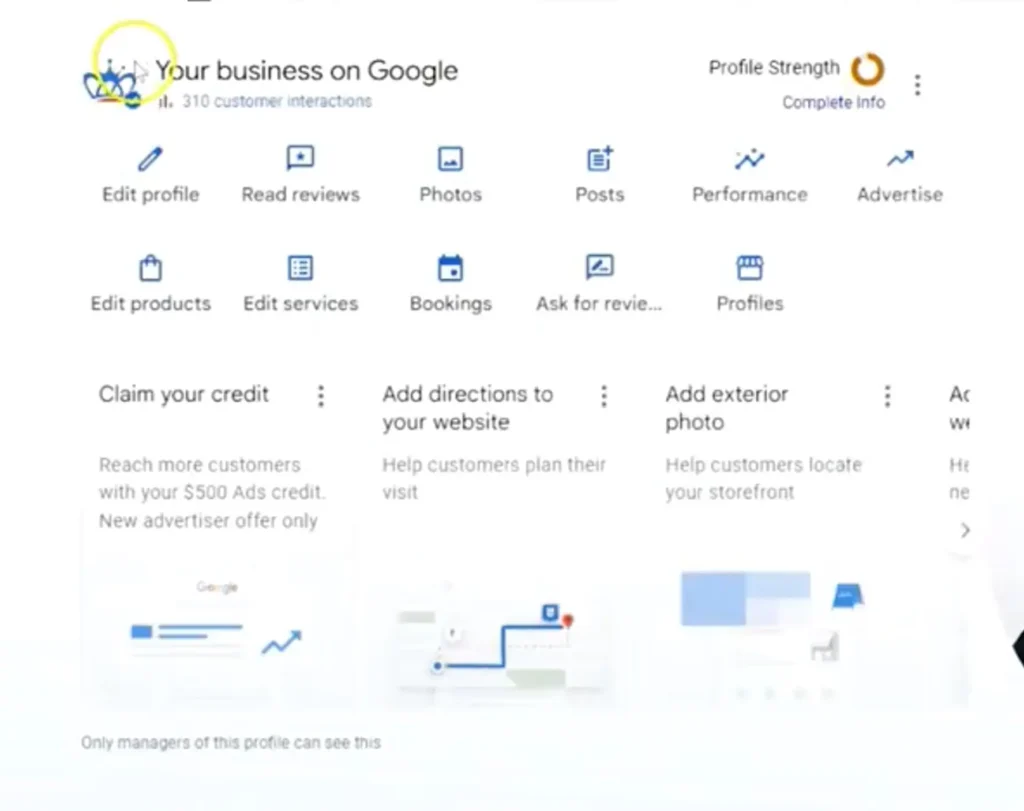
Start by searching for your business on Google. Once your profile appears, click on it to access your dashboard. This is your control center for managing posts, reviews, photos, and more.
Step 2: Navigate to Posts
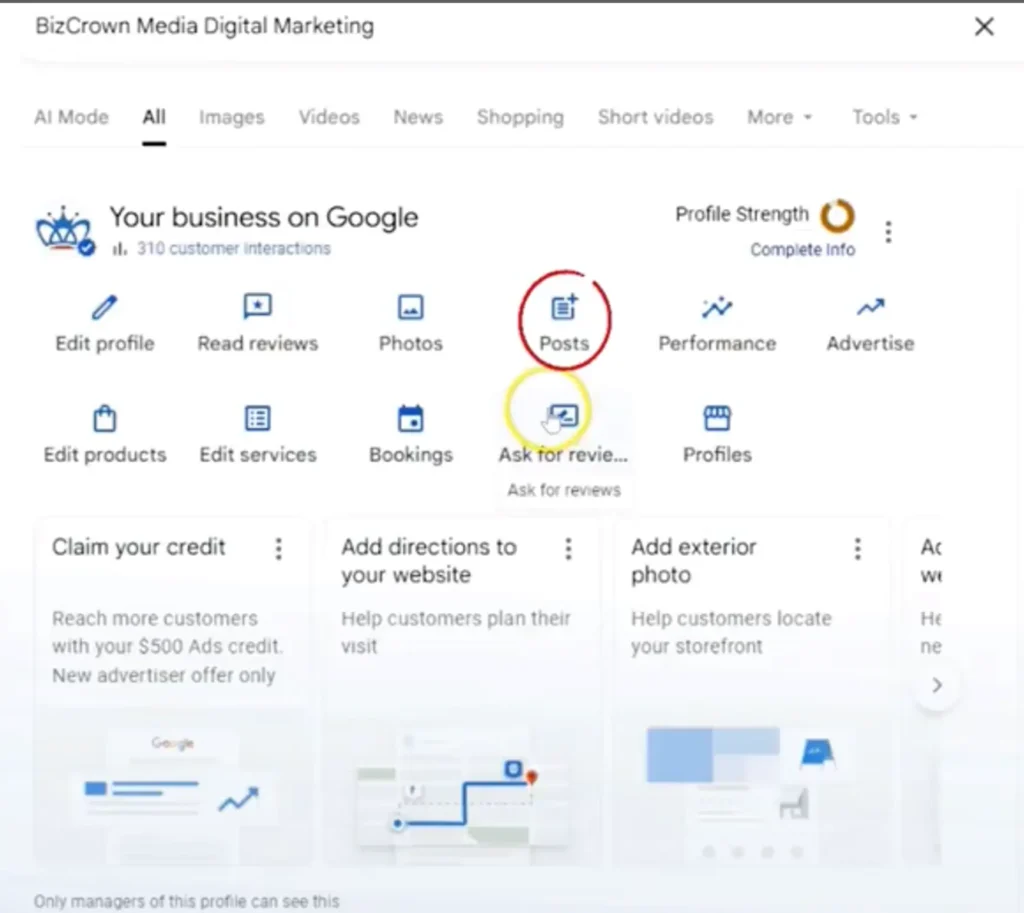
From your dashboard, click on Posts. This will show you all your previously published posts and give you the option to create a new one.
Step 3: Create a New Post
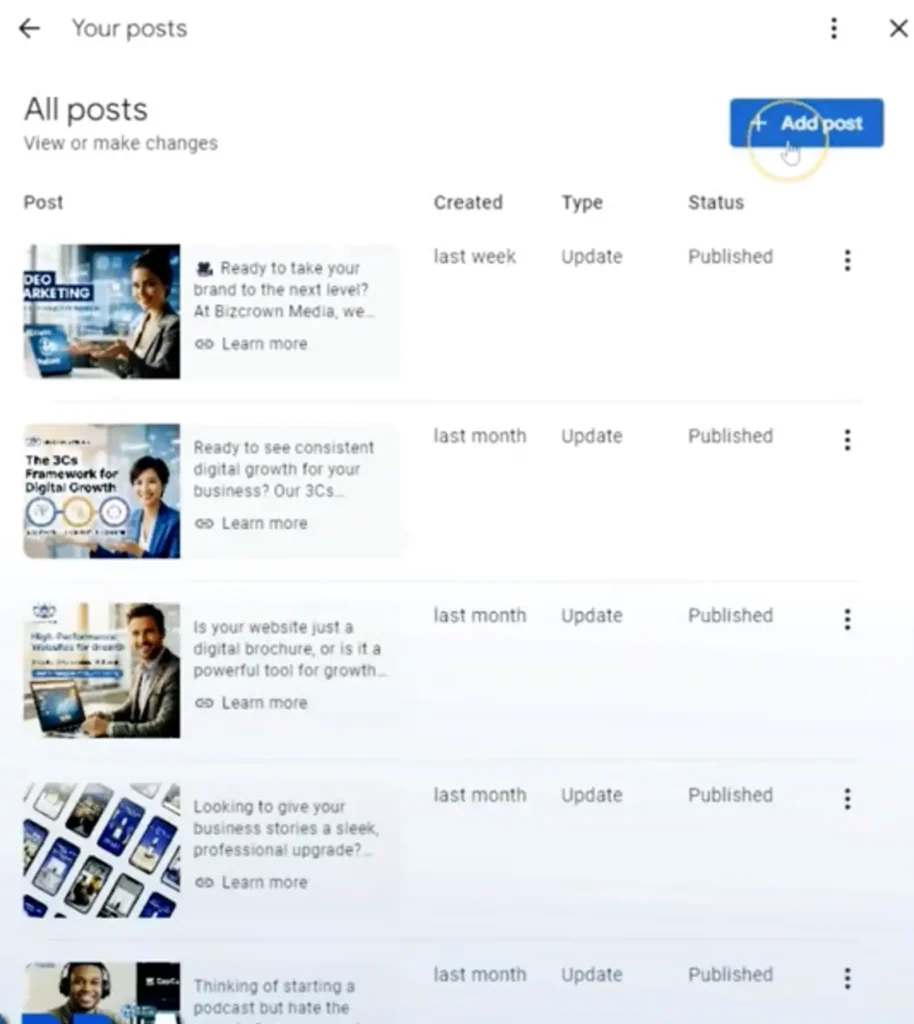
Click Add Post. You’ll then be prompted to choose the type of post you want to create:
- Update – General business news or announcements
- Offer – Promotions or discounts
- Event – Upcoming events with a date and time
Add your caption, upload an image, and select a call-to-action button. Options include “Call Now,” “Learn More,” “Book,” and others depending on your post type.
Step 4: Schedule the Post
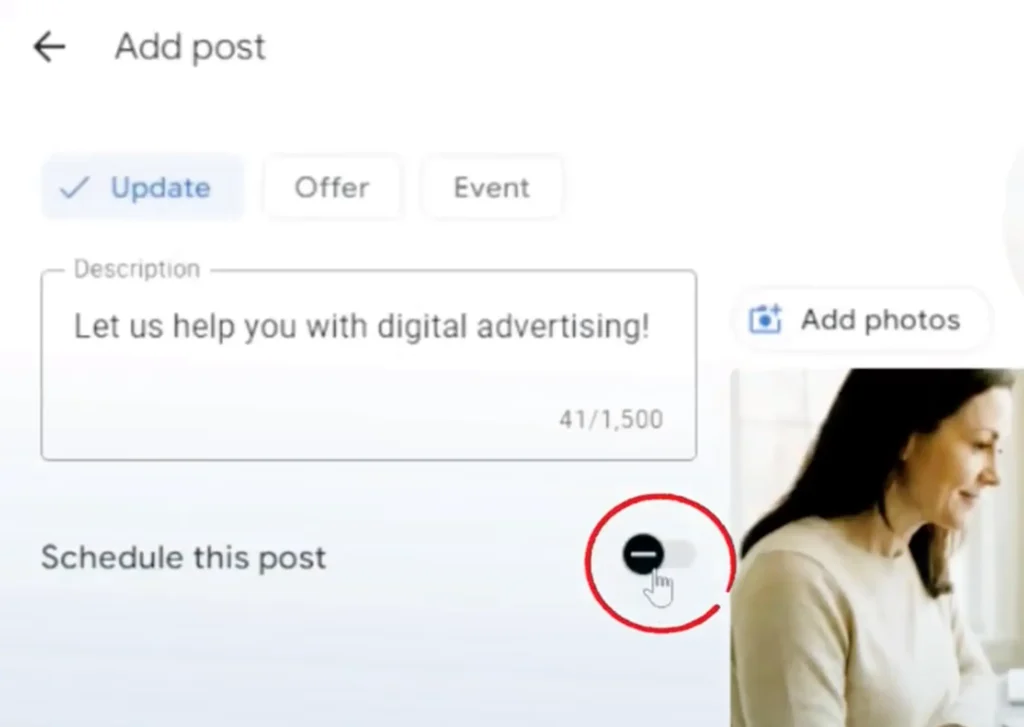
Once your content is ready, look for the Schedule This Post option. Select your preferred date and time, then click Post.
If you manage multiple business locations, Google will ask whether you want to copy the post across all profiles. This is a useful feature for multi-location businesses looking to maintain consistency across their brand.
Step 5: Review Your Scheduled Posts
After scheduling, you can view the post in your Posts dashboard. It will display the post type, the time it was created, and the scheduled publish date. From here, you can also edit or delete the post using the three-dot menu if you need to make changes before it goes live.
That’s it. Once scheduled, the post will publish automatically, no manual action required.
Best Practices for Google Business Profile Posts
Scheduling is only half the equation. To get real results, the content itself needs to be strong. Keep these best practices in mind:
Post at least once per week. Frequency matters. A steady cadence signals to Google that your business is active, which supports better placement in local search results.
Use high-quality images. Posts with clear, professional photos consistently outperform text-only posts. Use real photos of your products, team, or location whenever possible.
Include a strong call to action. Every post should guide the reader toward a next step—whether that’s calling your business, visiting your website, or claiming an offer. Vague posts without direction tend to underperform.
Vary your post types. Rotating between updates, offers, and events keeps your profile fresh and gives Google more content to index.
Write for your customer, not for Google. Stuffing posts with keywords doesn’t work. Write naturally, focus on what’s useful or compelling to your audience, and the SEO benefits will follow.
Troubleshooting Common Issues
Post not appearing on Google? It can take a few hours for new posts to appear publicly. If a post hasn’t shown up after 24 hours, check whether it was published or is still in draft/scheduled status.
Images rejected? Google has strict image guidelines. Make sure your images meet the required dimensions (at least 720 x 720 pixels), are in JPG or PNG format, and don’t contain promotional text overlaid on the photo.
Scheduled post didn’t publish? Double-check that the correct time zone is set on your Google account. Time zone mismatches are a common reason posts go live at unexpected times—or not at all.
Post removed by Google? Google may remove posts that violate its content policies. Avoid posts with excessive promotional language, misleading claims, or content that goes against Google’s guidelines.
Tracking Your Post Performance
Once your posts are live, it’s worth keeping an eye on how they perform. Inside Google Business Profile, the Performance tab gives you data on:
- How many times your profile was viewed
- The number of clicks on your website, call button, or direction links
- Which posts generated the most engagement
Use this data to refine your approach over time. If offer posts consistently drive more calls than updates, lean into that. If posts published on Tuesdays outperform those on Fridays, adjust your schedule accordingly.
Small businesses that treat Google Business Profile as a living, breathing marketing channel—rather than a “set it and forget it” listing—are the ones that see the greatest return.
Start Scheduling Today
Scheduling posts on Google Business Profile removes one of the biggest barriers to consistent local SEO activity: time. You no longer need to carve out time mid-week to publish. Create your content when it suits you, set the schedule, and let Google handle the rest.
The businesses that show up consistently in local search results aren’t necessarily doing anything extraordinary. They’re simply showing up—week after week, with relevant content and a clear next step for their customers.
Start by scheduling your next four posts this week. One per week, a clear image, and a call to action. That single habit can meaningfully improve your local visibility over time.
Elevate Your Brand with BizCrown Media
Explore our full-service agency solutions in SEO, Social Media Operations, Web Design & AI Automation, or download ready-to-use digital assets in our shop.
Dr. Mayo Adegbuyi is the president of BizCrown Media, where he assists businesses with digital marketing strategies and services to grow their awareness and revenue. He holds a Bachelor's in Fine Arts (Graphic Design), a Master's in Integrated Marketing Communications, and a Doctorate in Business Administration. With over 4 million YouTube views and extensive leadership experience, Dr. Mayo blends creativity, strategic insight, and cutting-edge techniques to accomplish business goals.