Consistency and Content are the pillars of business success, especially for high-revenue businesses looking to scale. Delegating tasks like managing your Google Business Profile is a critical first step toward achieving that growth. But to do this safely and effectively, you need to know how to grant secure access to your team or agency.
This process is more than just a technical step; it’s a strategic move that protects your brand while empowering your partners to deliver results. This guide will walk you through the process, explain why it’s vital for your operations, and show you how to leverage delegation to scale your local presence.
How to Add a User to Your Google Business Profile
Granting access to your profile is a straightforward process. If you are partnering with an agency like BizCrown Media, you will need to provide them with administrative access to manage your local marketing effectively. Follow these steps to get it done right.
Watch this quick video for a step-by-step walkthrough of granting access to your Google Business Profile. Perfect for busy professionals who want to get it right the first time.
Step 1: Sign Into Your Profile
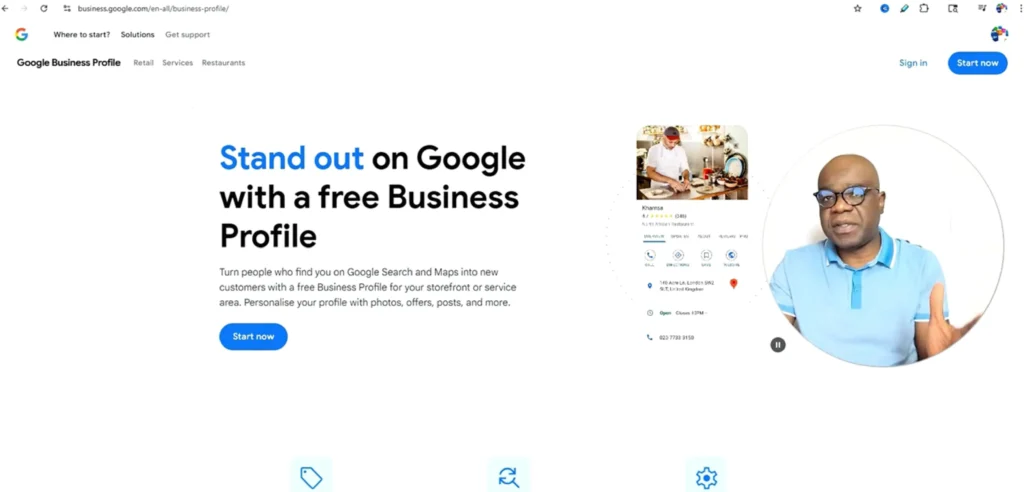
First, you need to access your Google Business Profile dashboard. You can do this by searching for “my business” on Google or by finding your business on Google Maps and clicking the “Manage your Business Profile” button.
- Pro Tip: Always ensure you are signed into the Google account that is the primary owner of the Business Profile.
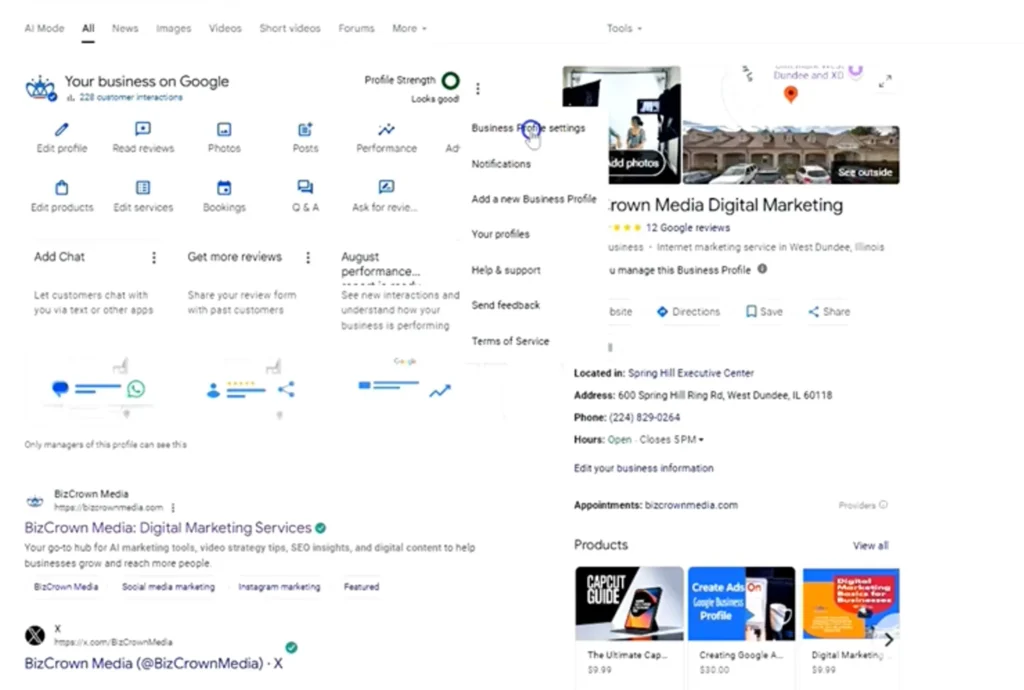
Step 2: Access Profile Settings
Once you are in your dashboard, locate and click the three vertical dots (menu) in the top right corner of the main management panel. From the dropdown menu, select Business Profile Settings.
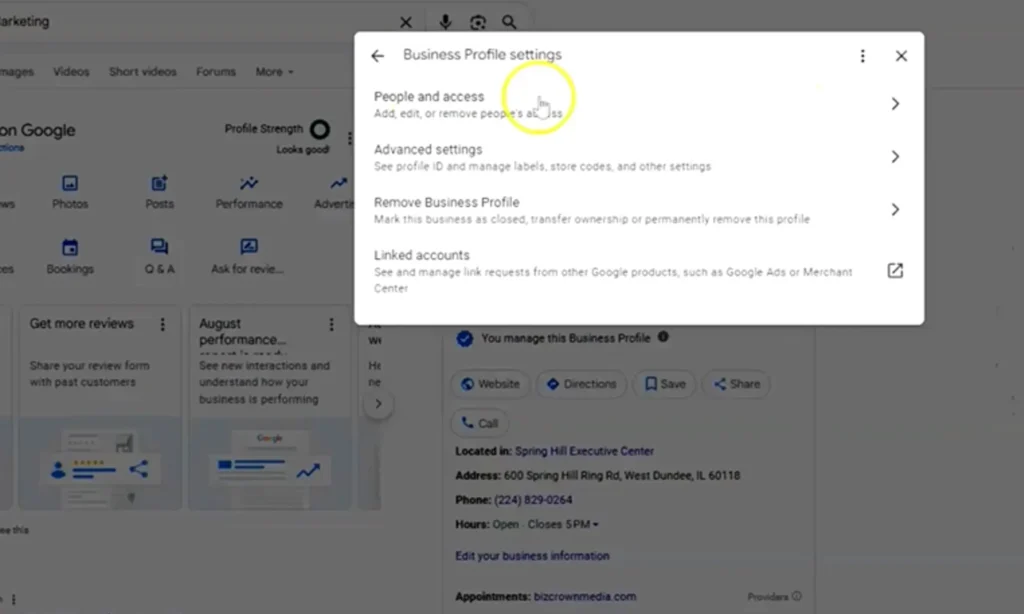
Step 3: Navigate to People and Access
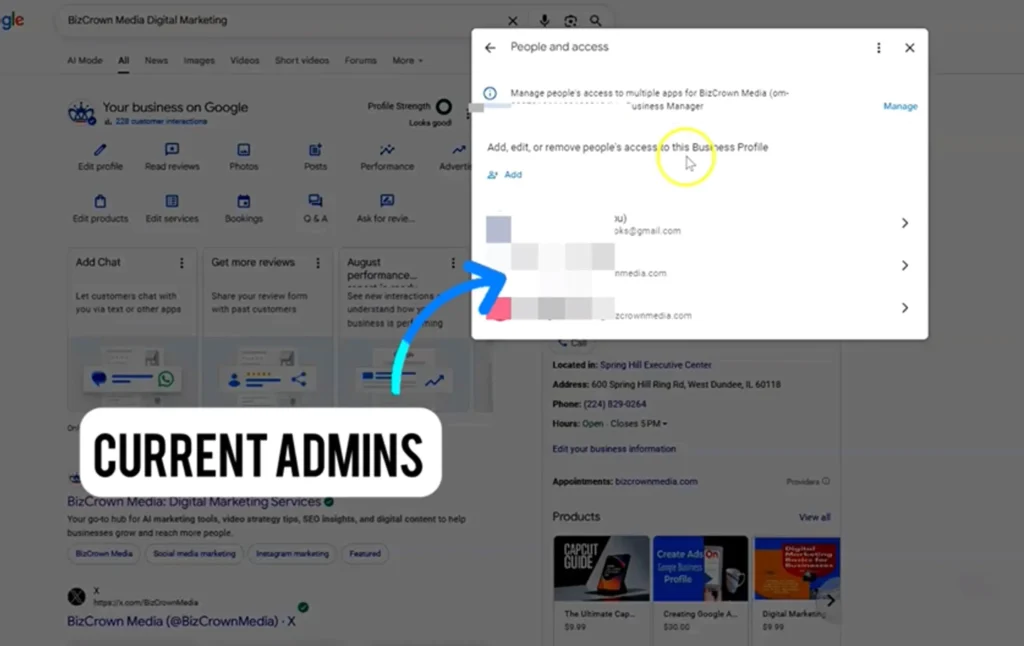
A new window will appear with several options. Click on People and access. This is the central hub where you can manage all users who have permissions for your profile.
- Pro Tip: Regularly review this section to ensure only current team members and partners have access.
Step 4: Invite a New User
To add a new team member or agency partner, click the Add icon (a person with a plus sign). A pop-up will prompt you to enter the email address of the person you wish to invite.
- Pro Tip: Use a business email address rather than a personal one (e.g.,
name@agency.cominstead ofname@gmail.com) for added security and professionalism.
Step 5: Choose the Correct Access Level
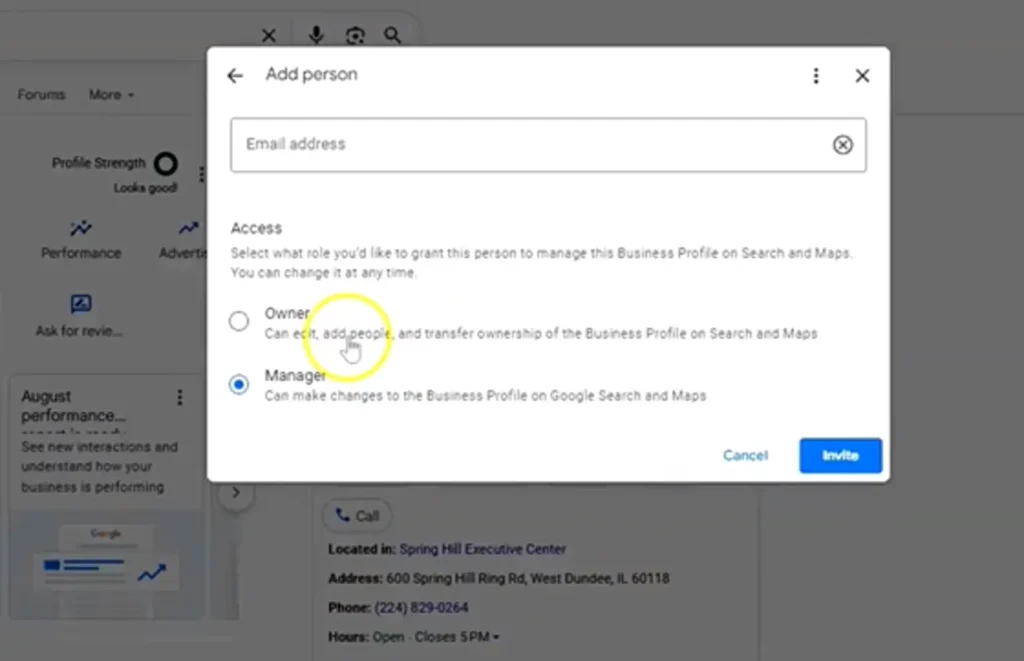
This is the most critical step. You will be asked to assign a role: Owner or Manager.
- Owner: This role has complete control, including the ability to add or remove other users, edit all business information, and connect advanced third-party services.
- Manager: This role has most of the same capabilities as an Owner but cannot add/remove users or transfer ownership. This is ideal for team members handling daily tasks.
After selecting the role, click Invite. The person will receive an email invitation to accept access to the profile.
Why Granting Access Matters for Your Business
Granting access to your Google Business Profile isn’t just a technical task—it’s a strategic move. By delegating responsibilities, you free up valuable time to focus on core business growth while ensuring your digital front door is managed by experts. This is especially critical for high-revenue businesses where brand consistency and digital security are non-negotiable.
Proper delegation allows for a dedicated focus on the Content and Consistency that fuel local search rankings. When an expert team manages your profile, you can be confident that your posts are timely, your reviews are answered promptly, and your business information is always accurate.
For example, when a client partners with BizCrown Media, one of the first things we do is request access. This allows our team to immediately begin optimizing their profile, scheduling a backlog of high-quality content, and implementing a review management strategy. This foundational work sets the stage for turning their profile into a powerful lead-generation tool.
The Strategic Difference: Manager vs. Owner
Assigning the right roles is crucial for keeping your operations running smoothly and securely. This decision goes beyond simple access; it’s about building an efficient and safe operational workflow.
In my doctoral research on social media operations, a recurring theme was the importance of structured delegation. Assigning roles correctly is a key part of your standard operating procedures (SOPs).
- A Manager role is perfect for an internal assistant or team member responsible for day-to-day tasks. They can handle the “Content” and “Consistency” of your weekly posts, respond to reviews, and update photos, all without having the ability to alter core profile permissions. This minimizes risk while enabling productivity.
- An Owner role is often required for an agency partnership. This level of access allows an agency like BizCrown Media to integrate your profile into larger performance hubs, connect advanced analytics tools like our Proburb SCA Engine, and manage other users. This ensures that your local marketing efforts are not only consistent but also data-driven and fully scalable.
Making the right choice here protects your digital assets while empowering your partners to do their best work.
Partner With the Experts
Managing a Google Business Profile effectively requires more than a one-time setup; it requires relentless consistency to maintain and dominate local search. If you’re ready to delegate, we have two paths to help you scale.
The “Do It For Me” Path Don’t have time to manage your Google Business Profile? Let BizCrown Media handle it for you. From weekly updates to review responses, we ensure your profile stays optimized and consistent. Get Started Today!
The “Scale Me” Path Ready to turn your profile into a lead-generation engine? Our Proburb SCA Engine uses this infrastructure to drive guaranteed traffic thresholds to your business. See If You Qualify
Check out our Marketing guides for more helpful topics and for more social media tips and digital app tips, join our newsletter and follow us on social media and YouTube. Contact us for Digital Marketing or Social Media support and assistance.
Elevate Your Brand with BizCrown Media
Explore our full-service agency solutions in SEO, Social Media Operations, Web Design & AI Automation, or download ready-to-use digital assets in our shop.
Dr. Mayo Adegbuyi is the president of BizCrown Media, where he assists businesses with digital marketing strategies and services to grow their awareness and revenue. He holds a Bachelor's in Fine Arts (Graphic Design), a Master's in Integrated Marketing Communications, and a Doctorate in Business Administration. With over 4 million YouTube views and extensive leadership experience, Dr. Mayo blends creativity, strategic insight, and cutting-edge techniques to accomplish business goals.